An introduction to Sending an IM with UCWA
Microsoft Unified Communications Web API (UCWA) is a REST API that exposes Lync Server 2013 Instant Messaging and Presence capabilities.
Tuesday, 27 January 2015
Note: This article is for Microsoft Lync 2013, which is no longer supported by Microsoft.
This is part 3 of a 4 part series.
- An introduction to Sending An IM With UCWA
- Part 1 - Send An IM With UCWA - Prerequisites
- Part 2 - Send An IM With UCWA - Creating the Application
- Part 3 - Send An IM With UCWA - Sending the IM
- Part 4 - Send An IM With UCWA - Setting Presence
- Part 5 - Send An IM With UCWA - Hints, Tips & Extra Goodies
Further reading:
Microsoft's Unified Communications Web API (UCWA) is a RESTful API that exposes Lync Server's Instant Messaging and Presence capabilities. This tutorial focuses on creating an Application and sending an Instant Message (IM), one of many activities enabled by UCWA, but by far the most commonly used.
This tutorial assumes you are familiar with HTTP APIs, RESTful concepts, OAuth and JSON.
The content in these articles are based on my own observations, references and examples from Microsoft's Lync Web Developer site, http://ucwa.lync.com, and demonstrates the techniques that form the foundation of my application Lync Agent.
Support Topologies
UCWA is only available on Lync Server 2013 on-premises deployments. In my world, on-premises can mean both within a corporate network, or hosted in a 3rd party Data Centre.
However, UCWA can deliver message to any Lync deployment, including:
- The local deployment
- External, On-Premises*
- Externally hosted*
- Lync Online/Office 365*
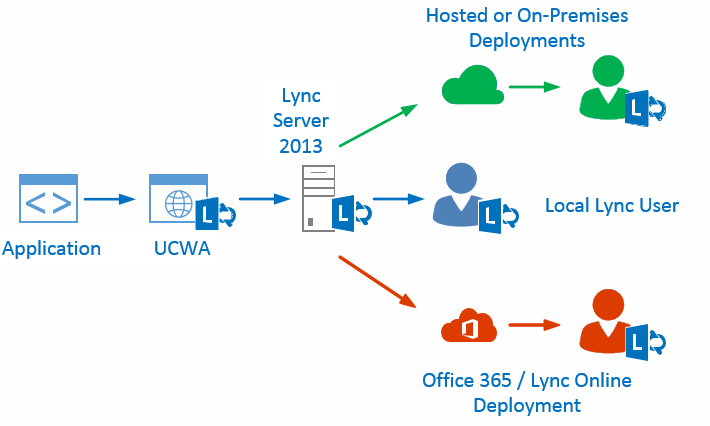
*Where Instant Messages are destined for non-local deployment of Lync Server, the external environment must be Federated with the local environment.
Microsoft has a great tutorial on how to Configure support for allowed external domains in Lync Server 2013.
Tags
Lync, UCWA, IM, Instant Message, Office 365, Skype for Business, Lync API, Lync SDK
Support this Site

Developer Courses

| Skype Web SDK: Getting Started |
| Skype Web SDK: Audio & Video |
Follow @MattProctorAU
Popular Articles
| What is Kutamo? |
| Kilimanjaro Climb |
| Kilimanjaro 2015 |
| Kilimanjaro 2013 |
| Australian Postcodes |
| New Zealand Postcodes |
| Worldwide City Database |
Favourite Links
| Kilimanjaro Climbs |
| Kutamo Studios |
| Kutamo Meetings |
| Litzi |
| ErrLog.IO |
| Kutamo |