Send an IM with UCWA - Step 3 - Sending the IM
UCWA, or the Unified Communications Web API, lets your send IMs easily using a simple HTTP RESTful API hosted on your Lync environment.
Friday, 30 January 2015
This is part 3 of a 4 part series.
- An introduction to Sending An IM With UCWA
- Part 1 - Send An IM With UCWA - Prerequisites
- Part 2 - Send An IM With UCWA - Creating the Application
- Part 3 - Send An IM With UCWA - Sending the IM
- Part 4 - Send An IM With UCWA - Setting Presence
- Part 5 - Send An IM With UCWA - Hints, Tips & Extra Goodies
Note: This article is for Microsoft Lync 2013, which is no longer supported by Microsoft.
Further reading:
This article demonstrates how to invite a Lync user to a conversation and deliver an Instant Message (IM) to their Lync client or application. The instructions below assume you've previously created an Application in Part 1.
Beginning the Conversation
The first step is to initialise the conversation by calling the startMessaging URL, and inviting the recipient to communicate.
Send a POST on the startMessaging URL
POST https://lync.contoso.com/ucwa/oauth/v1/applications/105/communication/messagingInvitationseWith the POST data being:
{
  "importance":"Normal",
  "sessionContext":"33dc0ef6-0570-4467-bb7e-49fcbea8e944",
  "subject":"Sample Subject Line",
  "telemetryId":null,
  "to":"sip:[email protected]",
  "operationId":"5028e824-2268-4b14-9e59-1abad65ff393"
}
Definitions:
- importance = The importance of the message, can be "Low", "Normal", or "High".
- sessionContext = A unique GUID you can create for this particular conversation.
- subject = The subject - this appears in the pop-up invitation the user will see.
- telemetryId = Unused currently.
- to = The recipient of your invitation, typically a Lync URI (SIP or Email Address).
- operationId = This is the OperatorID created in Part 1.
UCWA will then return 201 Created if the invitation was sent.
Send a GET on the event URL
GET https://lync.contoso.com/ucwa/oauth/v1/applications/102/events?ack=2UCWA will then return a JSON representation of the current conversation, including the invitation status.
"_embedded":{
       "conversation":{
              "state":"Connecting",
              "threadId":"0c7e9e90916041099ffd46075944f433",
              "subject":"Example Message Subject",
              "activeModalities":[],
              "importance":"Normal",
              "recording":false,
              "_links":{
                "self":{"href":"/ucwa/oauth/v1/applications/102/communication/conversations/21a1"},
                 .
                 .
                "messaging":{"href":"/ucwa/oauth/v1/applications/102/communication/conversations/21a1/messaging"},
              },
        }
}
The JSON response above has been abbreviated for simplicity.
If the conversation state is not "connected", the application should wait briefly and re-try this step, until the state changes to "success". If the recipient ignores the invitation, the state will change to "disconnected"
Once the conversation has connected, calling the events URL will return additional resources required to send an Instant Message.
"_embedded":{
        "messaging":{
              "state":"Connected",
              "negotiatedMessageFormats":["Plain"],
              "_links":{
                "self":{"href":"/ucwa/oauth/v1/applications/102/communication/conversations/21a1/messaging"},
                "conversation":{"href":"/ucwa/oauth/v1/applications/102/communication/conversations/21a1"},
                "stopMessaging":{"href":"/ucwa/oauth/v1/applications/102/communication/conversations/21a1/messaging/terminate"},
                "sendMessage":{"href":"/ucwa/oauth/v1/applications/102/communication/conversations/21a1/messaging/messages"},
              },
              "rel":"messaging"
            }
        },
}
The code 21a1 represents a unique identifier for each conversation, and should be used for subsequent actions below.
| Resource | Description |
| negotiatedMessageFormats | The current modalities available for this conversation, such as Plain Text and/or HTML. Refer to the Part 5 - Hints & Tips for details on how to change modalities. |
| conversation | A collection of resources containing settings and events for the conversation |
| sendMessage | This URL is used for actually sending the Instant Message. |
| stopMessaging | URL used to terminate a conversation. |
Sending the Message!
Send a POST on the sendMessage URL, passing it your actual message.
POST https://lync.contoso.com/ucwa/oauth/v1/applications/102/communication/conversations/21a1/messagingWith the POST data being your message in Plain Text or HTML (if specified as an allowed modality)
Testing 1... 2... 3...
UCWA will then return 201 Created if the message was successfully processed.
To send subsequent messages, simply repeat the process of POST'ing to sendMessage until you have nothing more to say.
Nothing more to say? Terminate the Conversation
Send a POST on the stopMessage URL to immediately terminate the conversation.
POST https://lync.contoso.com/ucwa/oauth/v1/applications/102/communication/conversations/21a1/terminate UCWA will then return 204 No Content, representing the end of the conversation.
Tags
Lync, UCWA, IM, Instant Message, Office 365, Skype for Business, Lync API, Lync SDK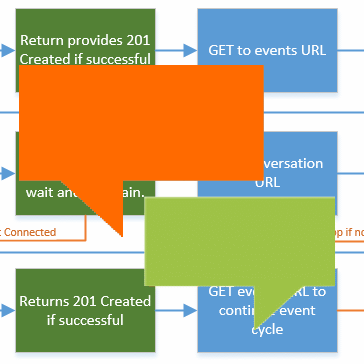
Support this Site

Developer Courses

| Skype Web SDK: Getting Started |
| Skype Web SDK: Audio & Video |
Follow @MattProctorAU
Popular Articles
| What is Kutamo? |
| Kilimanjaro Climb |
| Kilimanjaro 2015 |
| Kilimanjaro 2013 |
| Australian Postcodes |
| New Zealand Postcodes |
| Worldwide City Database |
Favourite Links
| Kilimanjaro Climbs |
| Kutamo Studios |
| Kutamo Meetings |
| Litzi |
| ErrLog.IO |
| Kutamo |