Building a Skype for Business Auto Responder using the Skype Web SDK
Tuesday, 3 November 2015
Introduction
Sometimes, you need to change your Lync or Skype for Business account, either to a new username or perhaps a new domain name. Like me, your account details are possibly all over social media and various networks, and whilst you can change them, people will inevitably try to contact you using your old details.
Setting up an old email account to respond automatically or even redirect is trivial - all modern email servers, including Office 365, provide this capability out of the box.
But Lync 2013 and Skype for Business server really have this ability.
So the Skype Web SDK comes to the rescue! :-)
The Application
This simple application logs in with your old credentials, and listens for new IMs. When one is received, it sends back a response, and optionally forwards the original message, including the senders details, to your new address. This makes it easy to send them a message from your new account letting them know that you're still contactable.
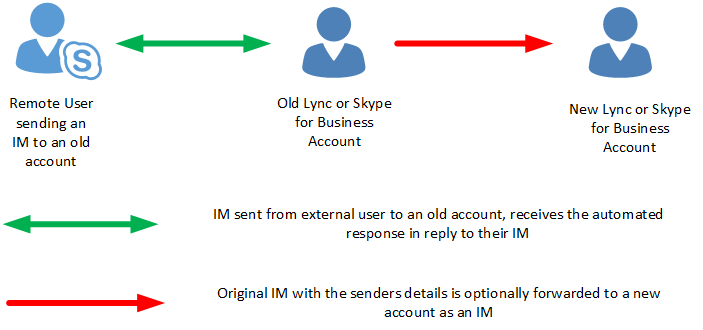
Caveats
The application requires a few things to function:
- Your old account technically still needs to remain active
- The application needs to be running 24/7 (not an issue these days)
This is because we are effectively creating a session with the old account and listening for new IMs.
This is also the basis for a IM Chatbot, but we'll get to that in a future article...
Prerequisites
The code below can only be run on a web server and Lync or Skype for Business environment that has been configured to support UCWA, and thus the Skype Web SDK.
See my Skype Web SDK Prerequisites article for more information on how to configure the SDK.
Options
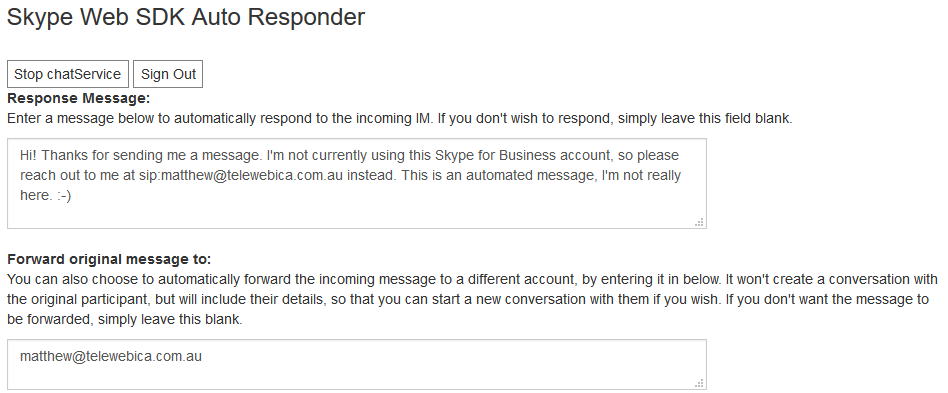
The application has two options:
- A message that is automatically sent back to the original participant - typically notifying them that your address has changed.
- Optional - A Lync or Skype for Business address to which the original message and the participant's details are forwarded
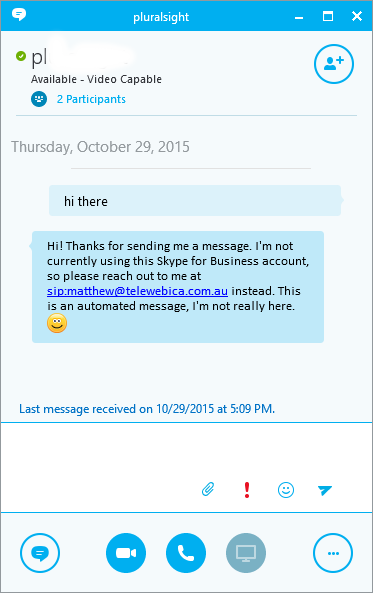
The application will automatically respond in real-time.
 |
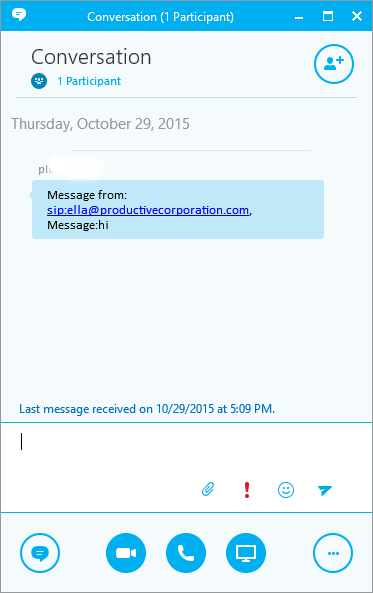 |
| Message sent to old address, and response automatically received. | Original message forwarded to new account, with link to original sender's address. |
How the Application works
The Auto Responder application is remarkably simple, and consists of a few basic steps.
- Initialize Skype Web SDK
- Authenticate with 'old' credentials
- Start a chat session without any participants
- Configure a listener object for new chat invitations (from external participants)
- If a new invitation is received:
- Accept invitation
- Respond with automated message
- Optionally forward the message to the 'new' address with the participant's details
- Wait for more invitations
The resulting code will look something like this:
log('Starting chatService...');
conversation.chatService.start().then(function () {
    log('chatService started!');
    $('#startChat').hide();
    //Register a listener for incoming calls
    log("Setting up listener for new conversations");
    client.conversationsManager.conversations.added(function (conversation) {
        log("Conversation invitation received");
        if (conversation.chatService.accept.enabled()) {
            // this is an incoming IM call
            conversation.chatService.accept().then(function () {
                log("Accepted conversation invitation");
                // Add a listener for new messages
                log("Setting up listener for new messages");
                conversation.historyService.activityItems.added(function (newMsg) {
                    if (newMsg.type() == 'TextMessage') {
                        var direction = newMsg.direction();
                        if (direction == "Incoming") {
                            var the_message = newMsg.text().toString().trim();
                            if (the_message == '') {
                                the_message = newMsg.html();
                            }
                            log(newMsg.sender.displayName() + ' : [' + the_message + ']');
                            var forward_address = $('#forward_address').val();
                            if (forward_address != '') {
                                send_instant_message(forward_address, 'Message from: ' + newMsg.sender.id() + ', Message:' + the_message + '')
                            }
                        }
                    }
                });
                // get the response message
                var response_message = $('#response_message').val();
                log("Sending back: " + response_message)
                conversation.selfParticipant.chat.state.when('Connected', function () {
                    conversation.chatService.sendMessage(response_message).then(function () {
                        log('Message sent.');
                    }).then(null, function (error) {
                        log('Error sending response:' + error);
                    });;
                });
            }).then(null, function (error) {
                // failed to accept the invitation
                log('Error accepting invitation:' + error);
            });
        }
    });

}).then(null, function (error) {
    log('Error:' + error);
});
Responding with the automated response message
In the code above, I'm injecting a new sendMessage call into the conversation and passing it my response message - this is a simple way of replying to the original participant without having to start a new message process.
Forwarding the original message as a new Instant Message
To save duplicating content, check out my article on how to send an instant message to learn how to instantiate the SDK in JavaScript and authenticate against a Lync or Skype for Business service.
In the example code below, I've used this code from this article but simplified it into a single function, accepting the destination address and the message itself.
Download
You can download the code to this project from GitHub, or check out the code below.
Download Follow @matthewproctorThe Full Code
<!doctype html>
<html>
<head>
    <title>Skype Web SDK Auto Responder</title>
    <!-- SkypeWeb library requires IE compatible mode turned off -->
    <meta http-equiv="X-UA-Compatible" content="IE=edge">
    <meta name="author" content="Matthew Proctor, Melbourne, Australia">
	<link rel="canonical" href="https://www.matthewproctor.com" />

    <!-- the jQuery library written by John Resig (MIT license) -->
    <script src="http://ajax.aspnetcdn.com/ajax/jQuery/jquery-1.11.3.min.js"></script>

    <!-- SkypeWebSDK Bootstrap Libray -->
    <script src="https://swx.cdn.skype.com/shared/v/1.1.23.0/SkypeBootstrap.min.js"></script>

    <!-- Load Bootstrap -->
    <link rel="stylesheet" href="https://maxcdn.bootstrapcdn.com/bootstrap/3.3.5/css/bootstrap.min.css">
    <script src="https://maxcdn.bootstrapcdn.com/bootstrap/3.3.5/js/bootstrap.min.js"></script>

    <!-- Javascript used in this demonstration -->
    <script src="index.js?13"></script>

    <!-- Styles for this demonstration -->
    <link href="index.css" rel="stylesheet">
</head>
<body>

    <div class="container">
        <h3>Skype Web SDK Auto Responder</h3>

        <div class="row">
            <div class="col-md-12 col-sm-12 col-lg-12">

                <div id="loginbox" class="loginbox input-group">
                    <div>Login</div>
                    <div id="address" contenteditable="true" class="input form-control"></div>
                    <div>Password</div>
                    <input type="password" id="password" name="password" class="input form-control" />
                    <div id="signin" class="button">Sign In</div>
                </div>
                <div id="chatfunctions">
                    <br>
                    <div id="startChat" class="button">Start chatService</div>
                    <div id="stopChat" class="button">Stop chatService</div>
                    <div id="signout" class="button">Sign Out</div>

                    <br>
                    <b>Response Message:</b>
                    <p>Enter a message below to automatically respond to the incoming IM. If you don't wish to respond, simply leave this field blank.</p>
                    <div class="input-group">
                        <textarea style="width:700px" id="response_message" class="form-control" rows="3">Hi! Thanks for sending me a message. I'm not currently using this Skype for Business account, so please reach out to me at sip:[email protected] instead. This is an automated message, I'm not really here. :-)</textarea>
                    </div>
                    <br>
                    <b>Forward original message to:</b>
                    <p>
                        You can also choose to automatically forward the incoming message to a different account, by entering it in below.
                        It won't create a conversation with the original participant, but will include their details,
                        so that you can start a new conversation with them if you wish.
                        If you don't want the message to be forwarded, simply leave this blank.
                    </p>
                    <div class="input-group">
                        <textarea style="width:700px" rows="1" id="forward_address" class="form-control">[email protected]</textarea>
                    </div>
                </div>
            </div>
        </div>
        <div class="row">
            <div class="col-md-12 col-sm-12 col-lg-12">
                <div class="small">
                    <b>Event Logs</b><br />
                    <div id="logging_box" contenteditable="false" class="code"></div>
                </div>

                <div class="col-md-6 col-sm-6 col-lg-6">
                    <div id="chat_window" contenteditable="false" class=""></div>
                </div>
            </div>
        </div>
    </div>
</body>
</html>
function log(texttolog) {
    var d = new Date();
    var time = padLeft(d.getHours(), 2) + ":" + padLeft(d.getMinutes(), 2) + ":" + padLeft(d.getSeconds(), 2) + ":" + padLeft(d.getMilliseconds(), 3);
    $('#logging_box').prepend(time + ": " + texttolog + "<br>");
}
function padLeft(nr, n, str) {
    return Array(n - String(nr).length + 1).join(str || '0') + nr;
}

function toTitleCase(str) {
    return str.replace(/\w\S*/g, function (txt) { return txt.charAt(0).toUpperCase() + txt.substr(1).toLowerCase(); });
}

function firstName(name) {
    if (name.indexOf("@") != -1) {
        //log("email");
        //email address returned, lets jus't display the first part
        //to protect their privacy
        name = name.split("@")[0];
        if (name.indexOf(".") != -1) { name = name.split(".")[0]; }
        if (name.indexOf("_") != -1) { name = name.split("_")[0]; }
        if (name.indexOf("-") != -1) { name = name.split("-")[0]; }
    }
    else {
        //log("full");
        //full name was returned, let's just display their first name
        name = name.split(" ")[0];
    }
    return toTitleCase(name);
}

function formatAMPM(date) {
    var hours = date.getHours();
    var minutes = date.getMinutes();
    var ampm = hours >= 12 ? 'pm' : 'am';
    hours = hours % 12;
    hours = hours ? hours : 12;
    minutes = minutes < 10 ? '0' + minutes : minutes;
    var strTime = hours + ':' + minutes + ' ' + ampm;
    return strTime;
}

function addChatMessage(direction, displayName, message) {
    var imageurl = "<img src='./images/noimage.png' width=32 height=32 />";
    if (displayName.indexOf("Bob") != -1) { imageurl = "<img src='./images/Bob.png' width=32 height=32 />"; }
    if (displayName.indexOf("Ella") != -1) { imageurl = "<img src='./images/Ella.png' width=32 height=32 />"; }

    var msgbox_style = "msgbox_incoming";
    if (direction != 'Incoming') {
        msgbox_style="msgbox_outgoing"
    }

    var newCard = "<p class='" + msgbox_style +"'>" + message + '</p>';
    var newChatline = "<div class='row' style='vertical-align:middle;'>";
    newChatline = newChatline + "<div class='col-md-2'>" + imageurl + "</div>";
    newChatline = newChatline + "<div class='col-md-7'>" + newCard + "</div>";
    newChatline = newChatline + "<div class='col-md-2'>" + formatAMPM(new Date()) + "</div>";
    newChatline = newChatline + "</div>";
    $('#chat_window').append(newChatline);
}

$(function () {
    'use strict';

    log("App Loaded");
    $('#chatfunctions').hide();

    var Application
    var client;
    var conversation;
    var conversation2;

    Skype.initialize({
        apiKey: 'SWX-BUILD-SDK',
    }, function (api) {
        Application = api.application;
        client = new Application();
        log("Client Created");
    }, function (err) {
        log('some error occurred: ' + err);
    });

    // when the user clicks the "Sign In" button
    $('#signin').click(function () {
        sign_in();
    });
    function sign_in() {
        $('#signin').hide();
        log('Signing in...');
        // and invoke its asynchronous "signIn" method
        client.signInManager.signIn({
            username: $('#address').text(),
            password: $('#password').text()
        }).then(function () {
            log('Logged In Successfully');
            $('#loginbox').hide();
            $('#chatfunctions').show();
            //create a new conversation
            log("Creating a new Conversation");
            conversation = client.conversationsManager.createConversation();
            log("Ready");
        }).then(null, function (error) {
            // if either of the operations above fails, tell the user about the problem
            log(error || 'Oops, Something went wrong.');
            $('#signin').show()
        });
    }

    $('#send_message').click(function () {
        var the_message = $('#the_message').text();
        if (the_message != "") {
            log('Sending message: ' + the_message);
            conversation.chatService.sendMessage(the_message).then(function () {
                log('Message sent.');
                $('#startChat').hide();
            }).then(null, function (error) {
                log('Error:' + error);
            });;
        } else {
            log('<b><font color=red>Please enter a message to send!</font></b>');
        }
    });

    $('#startChat').click(function () {
        start_chat();
    });
    function start_chat(){
        log('Starting chatService...');
        conversation.chatService.start().then(function () {
            log('chatService started!');
            $('#startChat').hide();

            //Register a listener for incoming calls
            log("Setting up listener for new conversations");
            client.conversationsManager.conversations.added(function (conversation) {
                log("Conversation invitation received");
                if (conversation.chatService.accept.enabled()) {
                    // this is an incoming IM call
                    conversation.chatService.accept().then(function () {
                        log("Accepted conversation invitation");

                        // Add a listener for new messages
                        log("Setting up listener for new messages");
                        conversation.historyService.activityItems.added(function (newMsg) {
                            if (newMsg.type() == 'TextMessage') {
                                var direction = newMsg.direction();
                                if (direction == "Incoming") {
                                    var the_message = newMsg.text().toString().trim();
                                    if (the_message == '') {
                                        the_message = newMsg.html();
                                    }

                                    log(newMsg.sender.displayName() + ' : [' + the_message + ']');
                                    var forward_address = $('#forward_address').val();
                                    if (forward_address != '') {
                                        send_instant_message(forward_address, 'Message from: ' + newMsg.sender.id() + ', Message:' + the_message + '')
                                    }
                                }
                            }
                        });

                        // get the response message
                        var response_message = $('#response_message').val();
                        log("Sending back: " + response_message)
                        conversation.selfParticipant.chat.state.when('Connected', function () {
                            conversation.chatService.sendMessage(response_message).then(function () {
                                log('Message sent.');
                            }).then(null, function (error) {
                                log('Error sending response:' + error);
                            });;
                        });

                    }).then(null, function (error) {
                        // failed to accept the invitation
                        log('Error accepting invitation:' + error);
                    });

                }
            });

        }).then(null, function (error) {
            log('Error:' + error);
        });
    }

    function send_instant_message(forward_address, the_message) {
        log('Forwarding to: ' + forward_address);
        log('Forwarding message: ' + the_message);
        //create a new conversation
        log("Forwarding: Creating a new Conversation");
        conversation2 = client.conversationsManager.createConversation();
        log("Forwarding: Starting chatService");
        conversation2.chatService.start().then(function () {
            log('Forwarding: chatService started!');
            conversation2.addParticipant("sip:" + forward_address).then(function () {
                log(forward_address + ' added!');
                pause(1000);
                log('Forwarding: Sending message: ' + the_message);
                conversation2.chatService.sendMessage(the_message).then(function () {
                    log('Forwarding: Message sent!');
                    pause(1000);
                    conversation2.chatService.stop().then(function () {
                        log('Forwarding: chatService stopped.');
                    }).then(null, function (error) {
                        log('Forwarding: Error Stopping chatService:' + error);
                    });
                }).then(null, function (error) {
                    log('Forwarding: Error Sending Message:' + error);
                });
            }).then(null, function (error) {
                log('Forwarding: Error adding participant:' + error);
            });
        }).then(null, function (error) {
            log('Forwarding: Error starting chatService' + error);
        });
    }

    $('#stopChat').click(function () {
        stop_chat();
    });
    function stop_chat() {
        log('Stopping chatService...');
        conversation.chatService.stop().then(function () {
            log('chatService stopped.');
            $('#startChat').hide();
        }).then(null, function (error) {
            log('Error:' + error);
        });
    }

    // when the user clicks on the "Sign Out" button
    $('#signout').click(function () {
        // start signing out
        log("Signing Out");
        client.signInManager.signOut().then(
                //onSuccess callback
                function () {
                    // and report the success
                    log('Signed out');
                    $('#loginbox').show();
                    $('#signin').show();
                    $('#chatfunctions').hide();
                },
            //onFailure callback
            function (error) {
                // or a failure
                log(error || 'Cannot Sign Out');
            });
    });
});
.input {
border: 1pt solid gray;
padding: 2pt;
overflow: hidden;
white-space: nowrap;
}

.button {
border: 1pt solid gray;
cursor: pointer;
padding: 2pt 5pt;
display: inline-block;
}

.button:hover {
    background: lightgray;
}

.signinframe > .button {
    margin-top: 8pt;
}

.userdetails {
    border: 1pt solid lightgray;
    padding:5px;
}

.logoutbox, .loginbox {
    padding: 5px 0 10px 0;
}

#logging_box {
    overflow-y: scroll; height:200px;
}

.msgbox_incoming {
    height:34px;
    background-color:#DFF0D8;
    -webkit-border-radius: 1px;-moz-border-radius: 1px;border-radius: 1px;
    border:1px solid #808080;
    padding: 5px;
}

.msgbox_outgoing {
    height:34px;
    background-color:#d8f0ec;
    -webkit-border-radius: 1px;-moz-border-radius: 1px;border-radius: 1px;
    border:1px solid #808080;
    padding: 5px;
}
Automatic Authentication
To save having to enter your credentials and click the sign in button, you can pre-fill the HTML form with your 'old' account credentials, and use javascript to pre-fill the password field (most browsers will ignore a password field with any text in it, if it is set just within the HTML file).
$(document).ready(function () {
    $('#password').val("mypassword");
});
You can then call the sign_in() and start_chat() methods in the application instead of waiting for the button click events, resulting in an application that automatically logs in and starts the chat service.
Warning: Configuring automatic authentication is risky - it exposes your 'old' account's username and password in the JavaScript file, and is generally not recommended. Do this only if you are you are aware of the risks, and I take no responsibility! :)
Further reading
Tags
Skype, Skype Web SDK, Lync, UCWA
Support this Site

Developer Courses

| Skype Web SDK: Getting Started |
| Skype Web SDK: Audio & Video |
Follow @MattProctorAU
Popular Articles
| What is Kutamo? |
| Kilimanjaro Climb |
| Kilimanjaro 2015 |
| Kilimanjaro 2013 |
| Australian Postcodes |
| New Zealand Postcodes |
| Worldwide City Database |
Favourite Links
| Kilimanjaro Climbs |
| Kutamo Studios |
| Kutamo Meetings |
| Litzi |
| ErrLog.IO |
| Kutamo |